Now available for macOS, Windows & Linux

AI writes markdown.
Meva makes it readable.

Claude, ChatGPT, Cursor, Copilot — they all generate markdown. But reading it? Still a mess. Meva is a fast, native app built for the AI era.

One-time purchase. Lifetime updates. No subscription.

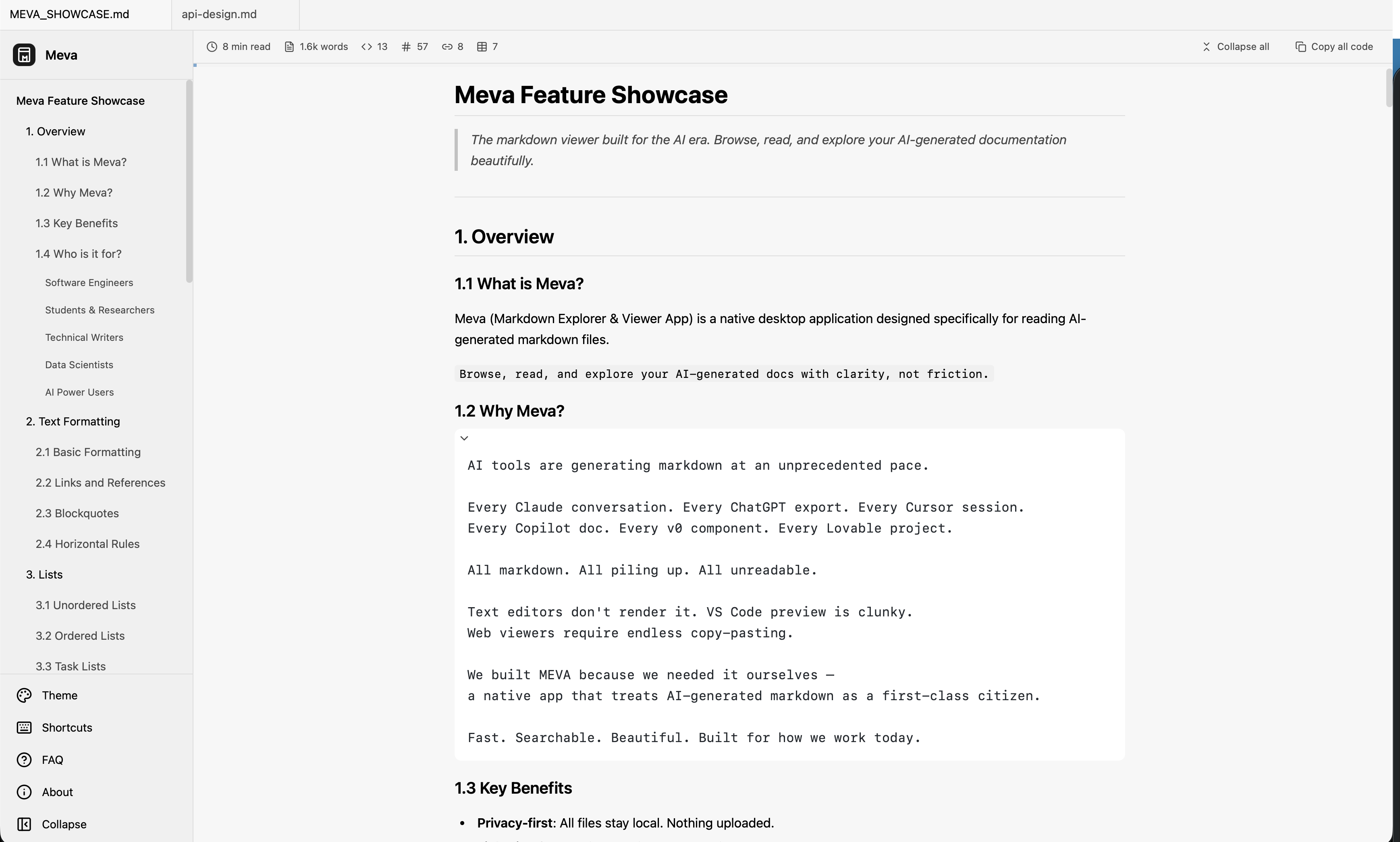
Meva App Preview

Built for docs generated by

Everything you need. Nothing you don't.

Meva does one thing — lets you read markdown — and does it exceptionally well.

Browse, don't organize.

Your AI docs stay where they are. Just point Meva at a folder and explore. No importing, no syncing, no project setup.

Light & Dark.

Switch themes with a click. Easy on the eyes, day or night.

LaTeX built-in.

Mathematical equations render beautifully. Perfect for academic and technical content.

Export when needed.

Share as PDF or HTML. No fuss.

Keyboard-first.

Navigate, search, and switch — without touching the mouse.

Built for people who live in markdown.

If you work with AI tools daily, you have markdown files daily. Meva is your reading companion.

Software Engineers

Cursor, Copilot, and Claude generate docs constantly. Browse them without leaving your flow.

Students & Researchers

ChatGPT explains concepts. Claude breaks down papers. Meva renders LaTeX beautifully.

Technical Writers

Documentation drafts, API references, changelogs — review them properly.

Data Scientists

Jupyter exports, model docs, analysis reports. Finally, a proper way to read them.

The Difference

Why not just use VS Code?

Because you deserve a tool built specifically for reading, not editing.

General-purpose tools
Built for everything, optimized for nothing
Project setup required Workspaces, config files, extensions to install
Heavy & slow to launch Electron bloat, memory hog, startup delay
Editor UI, not reader UI Sidebars, tabs, panels — visual clutter
LaTeX? Good luck. Extensions that half-work, if at all
Meva
Purpose-built for reading AI docs
Zero setup Open a folder and browse. That's it.
Native & instant Lightweight native app. Launches in milliseconds.
Reading-first design Beautiful typography. No distractions.
LaTeX built-in Math renders perfectly. Always.

Simple, honest pricing.

One-time purchase. No subscriptions. No upsells. No nonsense.

Free
Powerful reading, zero cost.
$0 forever
Download Free
  • Full markdown rendering
  • Syntax highlighting (100+ languages)
  • Math equations (KaTeX)
  • Mermaid diagrams
  • Table of Contents sidebar
  • In-document search
  • Live reload
  • Session persistence
  • Up to 3 tabs
  • 1 light + 1 dark theme

Frequently Asked Questions

Meva uses a one-time purchase model—no subscriptions or recurring fees.

Free ($0): Core markdown viewing, 3 tabs, 2 themes
Pro ($14.99): Unlimited tabs, all 12 themes, export, recent files, 5 device activations

Your Pro license never expires and includes all minor updates.
Yes! Meva offers a 7-day free trial of Pro features:
• No credit card required
• Full access to all Pro features
• Trial starts when you click "Start Trial"
• After 7 days, you can continue using the free version or upgrade
1. Open Meva and click the license badge in the sidebar (or go to Settings)
2. Click "Upgrade to Pro"
3. Complete checkout via our secure payment partner (Paddle)
4. You'll receive a license key via email
5. Enter the license key in Meva to activate
We use Paddle as our payment processor, which accepts:
• Credit/debit cards (Visa, Mastercard, Amex)
• PayPal
• Apple Pay / Google Pay (where available)
• Wire transfer (for large orders)
Yes. After purchase, Paddle automatically emails a receipt. For a formal invoice:
1. Check your email from Paddle
2. Or log into your Paddle account to download invoices
Yes, we offer a 30-day money-back guarantee. If you're not satisfied:
1. Email support@usemeva.com within 30 days of purchase
2. Include your license key or purchase email
3. We'll process your refund through Paddle

Note: Refunds are not available if the license key has been shared or resold.
Yes! Your Pro license allows personal and commercial use.
1. Purchase a license from the app or website
2. Check your email for the license key
3. In Meva, click the license badge → "Enter License Key"
4. Enter your email and license key
5. Click "Activate"
One Pro license allows activation on up to 5 devices simultaneously.

What counts as a device:
• Each computer (Mac, Windows, Linux)
• Each user account on a shared computer
• Each virtual machine

Example: You can activate on your work Mac, home Windows PC, laptop, and 2 more devices.
Yes! You have two options:

Option 1: Deactivate from old device
1. On your old device, open Meva
2. Go to Settings → License → Deactivate
3. Activate on your new device

Option 2: Deactivate remotely (if old device is unavailable)
Contact support@usemeva.com and we'll reset your activations.
If you try to activate on a 6th device, you'll see: "Device limit reached (5/5)"

Solutions:
1. Deactivate an unused device (from the device or remotely)
2. Purchase an additional license for more devices
In Meva:
1. Click the license badge in the sidebar
2. Or go to Settings → License

You'll see:
• Your current status (Free, Trial, or Pro)
• Days remaining (if on trial)
• Activated email (if Pro)
From the device:
1. Open Meva
2. Go to Settings → License
3. Click "Deactivate License"

Remotely (device lost, sold, or inaccessible):
Contact support@usemeva.com with your license key.
1. Download Meva (free)
2. Click "Start 7-Day Free Trial" when prompted
3. Enjoy all Pro features for 7 days
4. No credit card required
5. After 7 days, choose to upgrade or continue with Free edition
You'll automatically switch to the Free edition:
• Limited to 3 open tabs
• Only Light and Dark themes available
• Export features disabled
• Recent files disabled

Your documents and settings are preserved—nothing is lost.
The trial is limited to one 7-day period per device. After it expires:
• Upgrade to Pro for $14.99 (lifetime)
• Or continue using the Free edition
No, the trial is one-time per device. If you've previously used a trial, you'll see "Trial already used" and can either:
• Upgrade to Pro
• Continue with Free edition
Check these common issues:

"Invalid license key" — Verify the key format (XXXX-XXXX-XXXX-XXXX). Copy/paste from email to avoid typos.
"Device limit reached" — Deactivate an unused device first
"Network error" — Check internet connection. Try again in a few minutes.
"Email mismatch" — Use the same email you used when purchasing

Still stuck? Email support@usemeva.com with your license key and error message.
1. Check your email: Search for "Meva" or "Paddle" in your inbox and spam folder
2. Check Paddle: Log into your Paddle account with your purchase email
3. Contact us: Email support@usemeva.com with your purchase email
This can happen if:
1. Different device: License activated on another device
2. License not entered: Go to Settings → License → Enter License Key
3. App data cleared: Re-enter your license key
1. Restart your computer
2. Check system requirements (see Technical section)
3. Reinstall Meva: Download fresh from our website
4. Report the issue: Email support@usemeva.com with:
   • Your OS and version
   • Steps that led to the crash
   • Any error messages
Your documents: Never. Everything stays on your device. We cannot access, read, or store your files.

Anonymous usage data: Only if you opt-in via Settings. This includes:
• App version and OS
• Feature usage (which buttons clicked)
• Crash reports

You can disable this anytime in Settings → Privacy.
Everything stays on your device. Meva doesn't have servers that store your data.

Your documents: Meva reads files directly from where you save them. We don't copy, cache, or move your files anywhere.
App preferences: Settings like theme choice and window size are stored locally in your system's standard app data location.
License information: Your activation status is stored securely on your device using your operating system's built-in credential storage.

Bottom line: Your files never leave your computer. There's no cloud sync, no backup to our servers, no data collection. Meva is a local-first app by design.
• License keys are validated through Paddle's secure API
• Keys are stored locally on your device
• We don't have access to your payment details (Paddle handles payments)
macOS: 11.0 (Big Sur) or newer — Intel & Apple Silicon
Windows: Windows 10 or newer — x64, ARM64
Linux: Ubuntu 20.04+ — x64, ARM64

RAM: 1 GB minimum
Input (viewing):
• Markdown (.md, .markdown)
• Text files (.txt)

Export (Pro only):
• PDF
• HTML
For basic use: No. Meva works fully offline for viewing markdown files.

Internet required for:
• Activating/deactivating license
• Checking for updates
You CAN:
• Use Meva on devices you own (up to 5 with one Pro license)
• Use for personal and commercial purposes
• Receive free updates within the same major version

You CANNOT:
• Share, sell, or redistribute your license key
• Reverse engineer or decompile the software
• Use trial/free version for commercial purposes beyond evaluation

Read full EULA →
Your license includes all updates within the same major version (e.g., 1.0 → 1.9).

Major version upgrades (e.g., 1.x → 2.0) may require a separate purchase. We'll announce pricing for major upgrades when they're released. Existing customers typically receive discounts.

Ready to read markdown
the way it was meant to be?

Download Meva and bring clarity to your AI-generated docs.